Computer Hacks of the Day
For those that are interested in following the development of this ambitious project, I have the source code up on the web now in a Git repository.
The Git repository is available here :
https://github.com/steveoc64/empireV
Or you can just grab the ZIP file (automatically generated by git to contain the latest code release) from here :
https://github.com/steveoc64/empireV/zipball/master
There is a fair bit of code there already, and quite a bit of rather cool functionality already.
This is a developer release, so its only useful at this point to those who just want to get into the code, and play around with the prototype. Requires some basic understanding of how to setup a web server, configure PHP / mySQL, etc.
Code-wise, its all vanilla CodeIgniter .. great little PHP framework with excellent reliability, speed and support. I haven't used CodeIgniter prior to this, but its good to know that it only took around a week to really get into. Top marks for codeigniter ;)
For non-developers who just want to
USE the damn thing - well, as soon as the whole package is complete, I will setup a hosted version so gamers can use it online without having to touch any code.
I have made a big effort with the user interface so far to provide a bit of a period feel for the system, and also to make sure that the computer doesn't unnecessarily take over the gaming experience.
Its still a miniatures game played with real people on real tables. The computer is only there for making the gaming experience even better.
I have also kept well away from using flash, or any other proprietary evils in the development of the system. I need to make sure that the finished result will work on all web browsers, all operating systems, and common devices such as ipads and possibly smartphones.
So far so good.
I have divided the development up into Phases that exactly match the game turn phases in the Empire V rules. So what I will do as far as blogging goes is to just post a quick update each time that a phase is fully completed, along with some screen shots and explanation.
That gives us the following status report :
(Green = all done and running)
Phase 1 - Issue operational orders to Corps and MEs |
Phase 2 - Test determination for all Infantry MEs |
Phase 3 - Test ME Morale |
Phase 4 - Attach / Detach Commanders |
Phase 5 - Declare Operational Orders |
Phase 6 - Activate Orders |
Phase 7 - ME under BreakOff order does grand tactical movement |
Phase 8 - All other MEs do grand tactical movement |
Phase 9 - Determine number of Bombardment rounds |
Phase 10 - Engaged MEs do tactical movment, and eligible artillery does bombardment |
(this is the big one actually) |
Phase 11 - Leader Casualties |
Phase 12 - Rally eligible units |
Phase 13 - Eligible units rest and recover fatigue |
Phase 14 - End of hourly round |
And now for the Player View screenshots :
(click any to see a full-sized image which is a bit more readable)
 |
This is the view each player gets to see on his forces.
The units are arranged as a tree, so you can see how the various battalions, squadrons and batteries are assigned to each brigade or division.
It gets a little complicated in Empire, since units are not only grouped into their respective brigades and divisions, but they are also grouped into manoeuvre elements in addition to this.
The system handles that little complexity nicely - each unit in the system has an immediate parent formation, and a manoeurve element as well. |
 |
Clicking on a unit displays the details that are visible for that unit.
This is presented to the user as a 'Visit to the unit, for a review on parade' ... hence a little bit of UI fluff, and some jquery goodness to animate the visit.
The player cannot see the exact details of losses, etc ... just a summary of the current state of the unit, as the officer in command of the unit would be likely to report it. |
 |
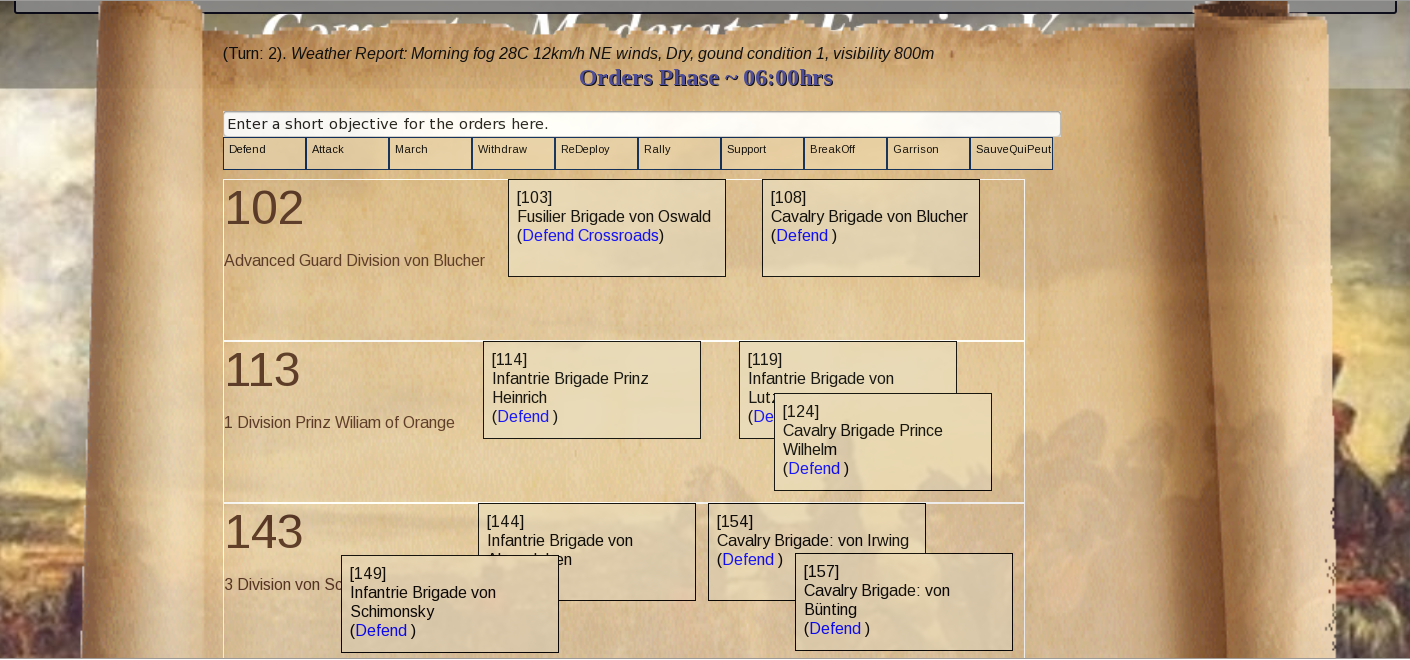
Each player communicates with his units through the orders screen.
In this example, there are several Divisions, each with a number of brigades. The player can drag the brigade boxes around to layout the formation of the whole Division.
This is important in Empire, as the manoeuvre elements require orders that specify the relative position of each manoeuvre element.
Orders can then be drag-and-dropped from the orders boxes onto the elements, depending on their type. (ie - support orders can only be dropped on cavalry brigades, garrison on infantry brigades, etc). In each case, the description in the objective field (at the top of the screen) is applied to the order.
Placing an order on a unit creates an order dispatch for the unit, and the back end system delivers the order to the unit some time in the future, dependent on the distance to the recipient, and the professional skill rating of the staff for each unit.
The details of how the delay is calculated are faithful to the way that Empire V calculates it.
This also allows for the computer to model some personalities for non-player sub-commanders with a really simple AI system. A rash and impetuous computer controlled sub-commander may randomly misinterpret an order to defend as meaning 'Push forward and attack the enemy', for example.
Remote Wargaming :
Really looking forward to getting this part working. So far, there is no technical reason why the system wouldnt work out of the box with some players accessing the game remotely from the other side of the world.
You still need a real-life table setup with real people and all that, but it would be nice to have a mate from another country take command of a brigade in the game, and run it from over the internet.
Just need a decent webcam streaming thing (with audio support) to make that a reality. |

Lets have a look at the Umpire view then ...
Note that the whole system is multi-user, so each user can be logged in at the same time, viewing their own data only, whilst the umpire is also logged in on another computer, controlling the flow of the game.
 |
This is the administrator view of the user accounts.
In this case the Admin user has assigned the user account 'Augereau' to command the French VII Corps, and has assigned the user 'Duke of Brunswick' to command the opposing Prussians.
In addition to that, the user 'Wartensleben' has been assigned command of the Prussian 2nd Division. When this user logs in, they will only be able to see the details of those units that are directly under their command (ie - 2nd Division forces)
This is interesting, since the user 'Duke of Brunswick' can see all of 2nd Divisions troops as well - as they are ultimately part of his wing, but he cannot issue orders to any units under 2nd Division. Only the delegate player 'Wartensleben' can do that.
The user 'Augereau' on the other hand gets to see and command all Divisions in his VII Corps, since he is the only user assigned to the French.
So the system allows multiple players per team to login to the system at the same time, and command a complex mix of delegation responsibilities. |
 |
Here is the Umpire / Admin view of the units involved in a game.
The Umpire gets to see a bit more detail on what is happening with each unit - note in this case that they can see accumulated actual casualties, as well as a detailed summary of actions in the previous turn which will have an effect on things like morale tests, and ME determination tests. |
 |
This is the main game control screen that the Umpire uses to run the game.
For each phase of a turn, this command console displays the details of what is happening in that phase, and provides the umpire with several buttons to control the flow of action.
In this case, it is simply the orders phase (Phase 1 in Empire), where users are given a couple of minutes to complete submitting their orders.
During orders phase, the umpire screen shows a clock counting up the seconds ... which changes from green, to blue, to finally red when 2 minutes has expired.
As players submit orders on their computers, the details of the orders automatically appear on this umpire screen (it polls the backend every 10 seconds to collect the latest orders).
This gives the umpire the opportunity to question any orders, or if they so choose, they can actually edit the order, add a delay to the order, or make the order dissapear. Its up to the umpire how they want to play that.
Once the umpire decides to close off the orders, they click the 'Close Orders' button. This advances the game to ME Determination phase.
After orders are closed, if any player submits a new order to the system, they get an immediate reply from their ADC telling them its too late :( |
 |
ME Determination Phase in the system.
The backend part of the system crunches through all the details for all units in the game, working out which units need to be checked .. digging up all the details, working out the % chances of failure, and then rolling the dice.
As you can see here, the report from the computer lays out all the steps that it takes to arrive at these results, including relevant die roll mods, etc.
This is still under Umpire control at this stage. If the Umpire decides that the result is not in the best interest of the game, for whatever reason, he can choose to 're-roll ME determination test' and get a completely fresh result.
Otherwise, click 'Accept ME Result' to apply the ME determination test and move on to the next phase. (ME Morale tests)
One thing I want to maybe add is an option to tell the computer that for a given game, player die rolls must be used instead of computer generated die rolls. In that case, the computer will add input boxes along the way to require the user to enter the value of the die rolls to be used in the calculations.
I think that option of allowing real-life die rolls to be used might be useful in any game, as it keeps the players 'involved' of you like, and kills any perception that the computer has taken the game over.
ME Determination results ... according to the rules, all ME determination results are to be made public to all players immediately. What I will do then is to create a dispatch message to all players if ANY unit from ANY side fails a determination test.
Other than that, any ME's that are becoming fragile through deteriorating morale or mounting losses, I am generating a dispatch message from the unit to the player, telling them in plain language that the unit is coming under some distress. (without the exact casualty details or % losses)..
The system, when its done, will be full of these little messages from the units arriving at the player's HQ. The beauty of having the computer handle all of this communication is that it can correctly manage the delay. For example, in the 3PM turn, the player may receive a message from a commander on a distant flank, who dispatched an urgent request for more ammunition at 1PM.
With the computer controlled sub-commander AI, dispatch reports from rash and impetuous sub commanders may be a little overly optimistic, whereas excessively cautious sub-commanders may exaggerate losses and the strength of enemy units. Lots of fun to be had with that, and great for Solo play as well. |
Thats all for now ... back to coding. Hopefully will be able to report back with more updates soon.